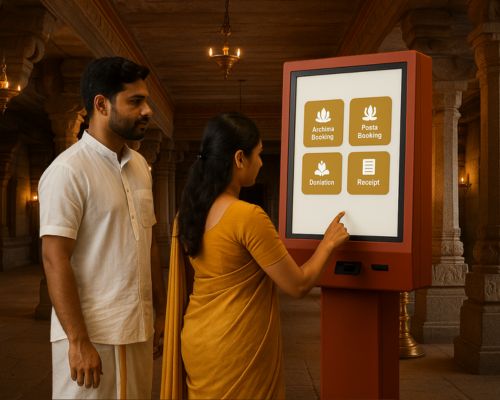
If you manage a temple, you already know what the counter looks like on a festival morning. Three staff members handling five different queues. Devotees asking the same questions. A register that is two entries behind. A phone ringing with a hall booking enquiry while someone at the counter is waiting for a receipt.
The kiosk does not solve this by adding more technology to an already stretched operation. It solves this by removing the bottleneck entirely.
What a Temple Kiosk Actually Does
A temple kiosk is a self-service terminal placed inside the temple premises. Devotees use it to book archanai, make donations, reserve halls, pre-order prasadam, and pay — without involving a single staff member.
But here is what most people miss. A kiosk on its own is just a payment machine. What makes it genuinely useful for temple administration is what happens after the devotee taps confirm.
When the kiosk is connected to a complete Temple ERP system like Grasp, that one tap triggers everything. The booking appears on the priest's schedule. The donation posts to the correct fund account. The prasadam order reaches the kitchen. The hall calendar blocks the slot. The accounts update in real time. No phone call. No manual entry. No follow-up.
That is the difference between a kiosk and an integrated kiosk.
What Changes on the Ground
Queues stop being your problem
Routine transactions — archanai bookings, lamp payments, donations, prasadam orders — move to the kiosk. Your counter staff stop being a bottleneck and start being available for the transactions that actually need human judgment. During festivals when footfall triples, the kiosk absorbs the volume your team cannot.
Vilakku stops being a queue too
Grasp's kiosk integrates directly with the Vilakku Vending Machine. Devotees pay at the kiosk and collect their lamp from the machine. No staff involved. No cash handled manually. Stock is tracked automatically and income posts directly to accounts. One of the longest queues in any temple — gone.
Hall bookings stop coming through phone calls
Devotees check live availability at the kiosk, select their date and session, pay the advance, and receive confirmation instantly. The slot is blocked immediately. Your admin team stops managing a phone-based back-and-forth and starts managing a clean, conflict-free calendar with zero double bookings.
Donations become fully transparent
Every donation made at the kiosk — hundi, annadhanam, ubayam, special funds — is recorded with the donor's details, receipted digitally, and posted to the accounting module in real time. When your committee asks for a fund-wise donation report, it is ready in seconds. When auditors arrive, everything is already in order.
The Kiosk and Your POS Counter Work Together
Introducing a kiosk does not mean removing your staffed POS counter. Both run simultaneously on the same platform. The kiosk handles routine self-service transactions. The POS counter handles complex requests, senior devotees who prefer staff assistance, and high-value transactions that need oversight.
Both post to the same accounts. Same inventory. Same reports. At the end of the day your counter closing is clean because there is nothing to manually reconcile between two systems.
What Your Management Sees
Every transaction at the kiosk feeds the management dashboard in real time. Collections, bookings, donations, inventory movement — all visible from any device without waiting for a staff report.
Your committee chairman can check festival day collections from his phone. Your finance officer sees accounts updating as transactions happen. Your kitchen team sees prasadam orders the moment they are placed. Everyone works from the same live data with no delays and no miscommunication.
This is what running a temple on a complete 32-module ERP system actually looks like in practice.
Not Just for Large Temples
A common assumption is that kiosk systems are only viable for large temples with high footfall. That is not accurate.
Smaller temples benefit significantly from reduced staffing pressure. When two staff members can manage what previously needed five, the operational cost drops and the quality of service improves. The kiosk pays for itself faster in a smaller temple than most committees expect.
Get a quotation and see how our temple ERP software digitalize your temple entirely.
Conclusion
If your temple is still running on manual counters, phone bookings, and paper registers — the kiosk is not an upgrade. It is a correction.
It gives devotees a faster, more transparent experience. It gives your staff breathing room to focus on service rather than administration. It gives your committee accurate, real-time visibility over every transaction.
And when it runs as part of Grasp's complete temple ERP, it is not a standalone terminal — it is the front face of an operation where everything is connected, everything is automatic, and nothing falls through the gaps.
See the full kiosk system and all 32 modules →
Book a free demo for your temple →
Frequently Asked Questions
Can the kiosk work without internet?
Yes. It operates offline and syncs all transactions automatically once connectivity is restored. No data is lost.
Is it suitable for small temples?
Yes. Smaller temples use it to reduce staffing pressure. Larger temples use it to manage festival crowd flow. It is fully configurable either way.
What payment methods does it support?
Cash, UPI, QR code, debit and credit cards, and bank transfers — with instant digital receipts on every transaction.
Does kiosk data post to temple accounts automatically?
Yes. Every transaction hits the accounting module in real time. No manual entry, no end-of-day reconciliation.
Can devotees book for a specific deity and time slot?
Yes. Live calendar by deity, pooja type, and available slots. Book, pay, and receive WhatsApp confirmation in minutes.
Is devotee data secure?
Yes. Cloud-based storage with role-based access, encryption, and regular backups. Fully audit-ready at all times.